| --- |
| tags: |
| - Mantis |
| - VLM |
| - LMM |
| - Multimodal LLM |
| - bakllava |
| base_model: llava-hf/bakLlava-v1-hf |
| model-index: |
| - name: Mantis-bakllava-7b |
| results: [] |
| license: apache-2.0 |
| language: |
| - en |
| --- |
| |
| # Mantis: Interleaved Multi-Image Instruction Tuning (Deprecated) |
|
|
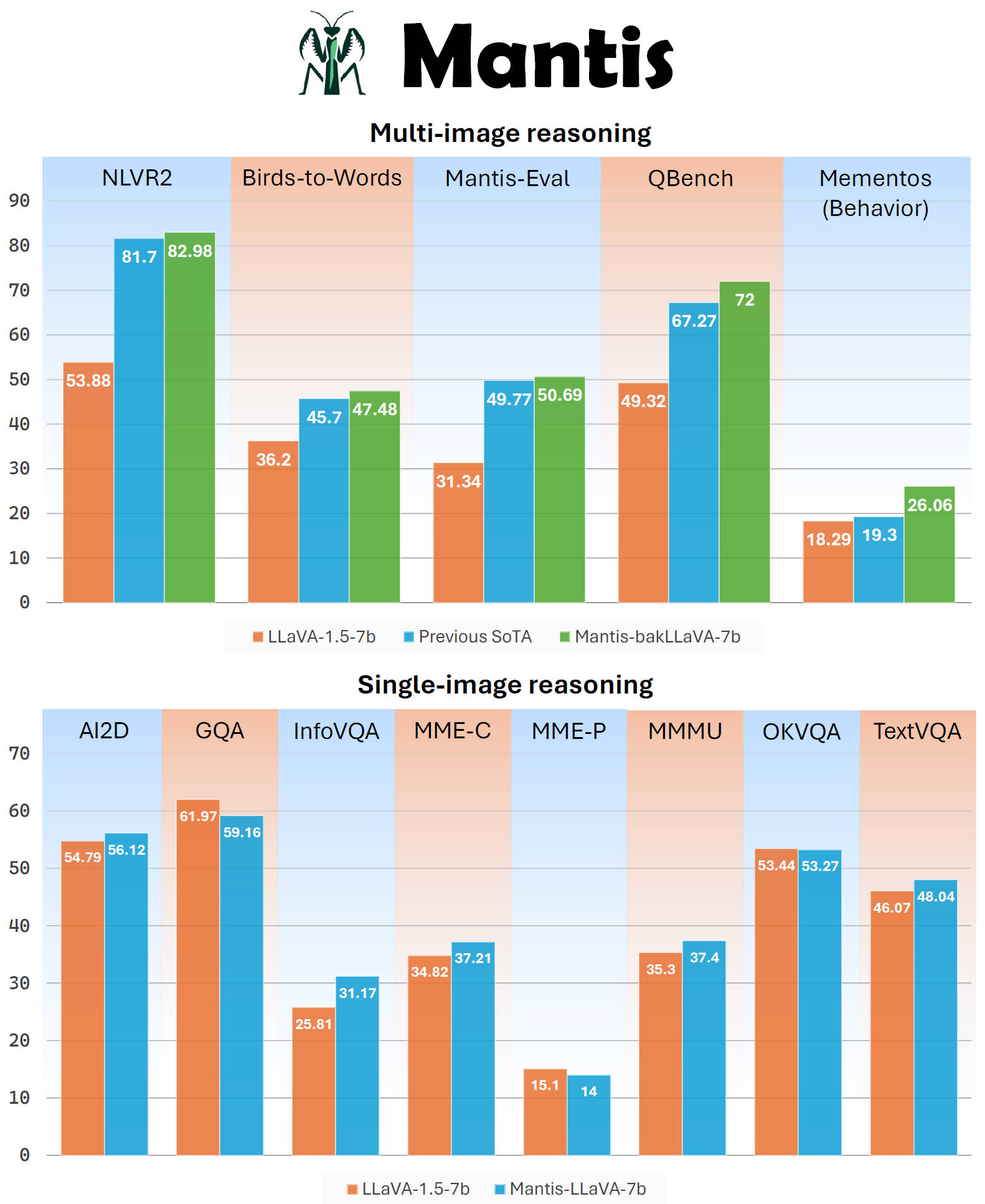
| **Mantis** is a multimodal conversational AI model that can chat with users about images and text. It's optimized for multi-image reasoning, where interleaved text and images can be used to generate responses. |
|
|
| **Note that this is an older version of Mantis**, please refer to our newest version at [mantis-Siglip-llama3](https://huggingface.co/TIGER-Lab/Mantis-8B-siglip-llama3). The newer version improves significantly over both multi-image and single-image tasks. |
|
|
| Mantis is trained on the newly curated dataset **Mantis-Instruct**, a large-scale multi-image QA dataset that covers various multi-image reasoning tasks. |
|
|
| |[Demo](https://huggingface.co/spaces/TIGER-Lab/Mantis) | [Github](https://github.com/TIGER-AI-Lab/Mantis) | [Models](https://huggingface.co/collections/TIGER-Lab/mantis-6619b0834594c878cdb1d6e4) | |
|
|
|  |
|
|
| ## Inference |
|
|
| You can install Mantis's GitHub codes as a Python package |
| ```bash |
| pip install git+https://github.com/TIGER-AI-Lab/Mantis.git |
| ``` |
| then run inference with codes here: [examples/run_mantis.py](https://github.com/TIGER-AI-Lab/Mantis/blob/main/examples/run_mantis_hf.py) |
|
|
| ```python |
| from mantis.models.mllava import chat_mllava |
| from PIL import Image |
| import torch |
| |
| |
| image1 = "image1.jpg" |
| image2 = "image2.jpg" |
| images = [Image.open(image1), Image.open(image2)] |
| |
| # load processor and model |
| from mantis.models.mllava import MLlavaProcessor, LlavaForConditionalGeneration |
| processor = MLlavaProcessor.from_pretrained("TIGER-Lab/Mantis-bakllava-7b") |
| model = LlavaForConditionalGeneration.from_pretrained("TIGER-Lab/Mantis-bakllava-7b", device_map="auto", torch_dtype=torch.bfloat16, attn_implementation="flash_attention_2") |
| |
| # chat |
| text = "<image> <image> What's the difference between these two images? Please describe as much as you can." |
| response, history = chat_mllava(text, images, model, processor) |
| |
| print("USER: ", text) |
| print("ASSISTANT: ", response) |
| # The image on the right has a larger number of wallets displayed compared to the image on the left. The wallets in the right image are arranged in a grid pattern, while the wallets in the left image are displayed in a more scattered manner. The wallets in the right image have various colors, including red, purple, and brown, while the wallets in the left image are primarily brown. |
| |
| text = "How many items are there in image 1 and image 2 respectively?" |
| response, history = chat_mllava(text, images, model, processor, history=history) |
| |
| print("USER: ", text) |
| print("ASSISTANT: ", response) |
| # There are two items in image 1 and four items in image 2. |
| ``` |
|
|
| Or, you can run the model without relying on the mantis codes, using pure hugging face transformers. See [examples/run_mantis_hf.py](https://github.com/TIGER-AI-Lab/Mantis/blob/main/examples/run_mantis_hf.py) for details. |